Quality
AOI for Encoder Discs: How Machines Spot Defects at a Glance

Pinholes, residual chrome and scratches on a disc are often only a few microns to a few tens of microns in size; human eyes tire and miss things after staring for long. AOI (automated optical inspection) finds defects and records their positions in four steps: illumination, imaging, comparison and classification. This article explains how it works and the respective strengths and limits of AOI and manual visual inspection.
On a 2,500-line disc, the line width at a read radius of 20 mm is only about 25 μm. To find a pinhole of a few microns among thousands of such lines, an inspector has to look cell by cell under a microscope; after a while the eyes tire and judgement drifts.
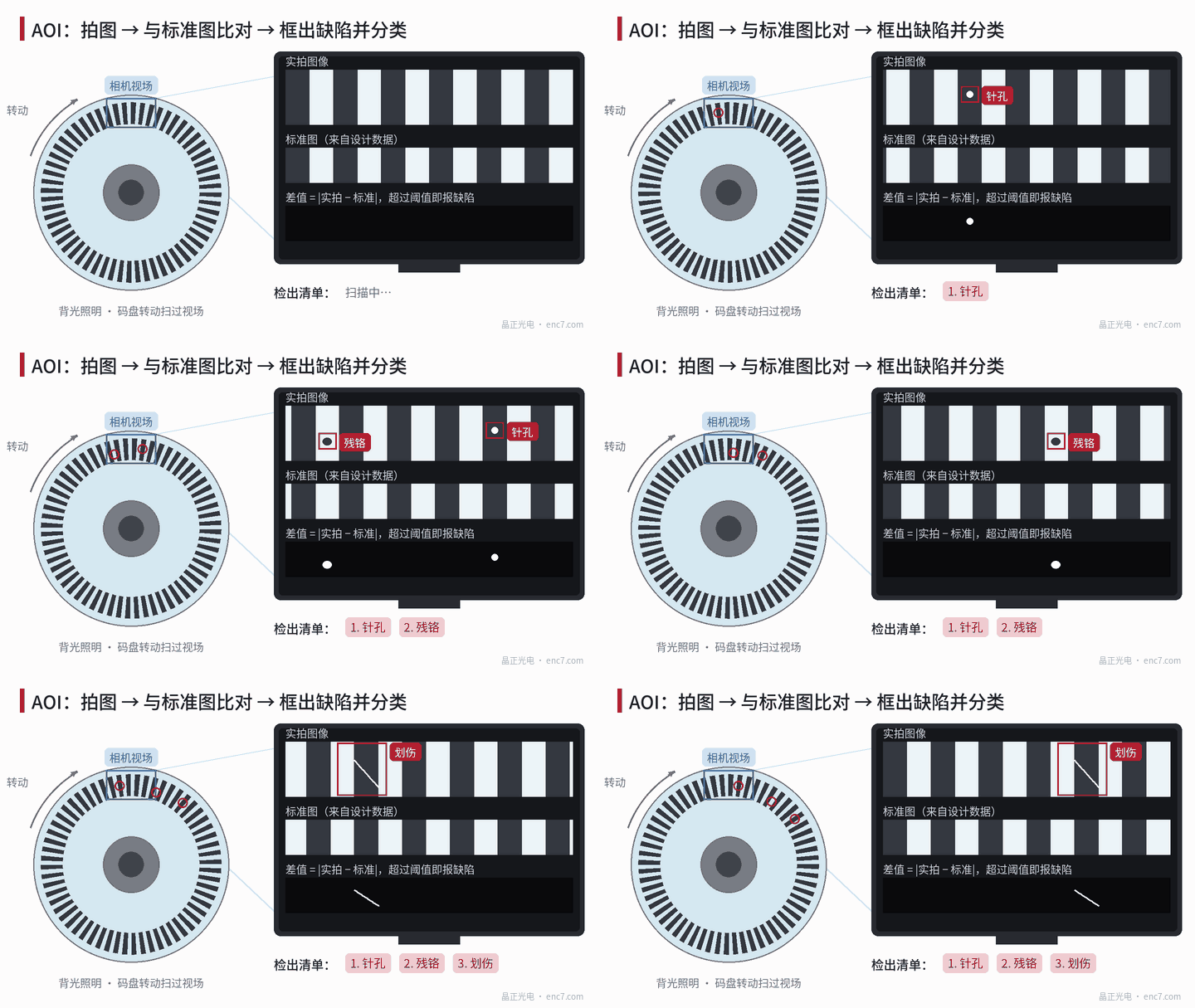
AOI lets cameras and algorithms do this “spot the difference” job: take an image, compare it with a reference, box the areas that differ significantly, and finally decide what kind of defect it is (Figure 1).
Step 1: illumination makes defects stand out
Illumination decides whether a defect can be seen at all. Glass discs are generally inspected with transmitted backlight: chrome lines block light and look black, glass transmits and looks bright. A pinhole becomes a bright spot in a black line and residual chrome becomes a dark spot in a bright gap — high contrast and the easiest to detect.
Reflective metal discs use coaxial reflected illumination. For surface scratches and particles, an oblique light is often added: a flat surface reflects the light away, while scratches and particles scatter it into the lens, showing up as bright lines on a dark background. Many systems combine several kinds of illumination, each catching different defects.
Step 2: imaging — pixels must be smaller than defects
To detect a defect reliably, it should generally cover at least a few pixels in the image. To catch a 5 μm defect, for example, each pixel should correspond to 1–2 μm. A camera 4,000 pixels wide then covers a field of only 4,000 × 2 μm = 8 mm, so the whole disc has to be shot in many fields, or the disc rotated and scanned continuously with a line-scan camera.
The higher the magnification, the shallower the depth of field. If the disc is slightly uneven, areas go out of focus, so high-magnification inspection places demands on fixturing and focusing. Resolution, field of view and inspection time have to be balanced together.
Step 3: comparison — finding what is different
Three judgement methods are common:
- Comparison with a reference image: the reference comes from design data or a disc confirmed as good. After aligning captured and reference images, they are subtracted pixel by pixel; areas whose difference exceeds a threshold are suspect points. Alignment must be very precise, or every line edge will show a difference.
- Periodic comparison: the incremental track is a repeating pattern, so each period can be compared with its neighbours and any cell that “looks different” flagged.
- Rule-based checks: directly measure line width, spacing and bright-spot area, and alarm when out of the set range.
Step 4: classification and recording
Once a suspect point is found, the algorithm extracts its area, length and width, brightness and shape: brighter than surroundings and round is usually a pinhole; darker than surroundings and in a gap is usually residual chrome or a particle; long and thin is usually a scratch. Combined with whether it lies in the read area and how many there are, a judgement is made.
AOI also stores the coordinates and image of every defect. If every disc has the same defect at the same position, the problem is most likely on the mask; if positions are random, particles and cleanliness are more likely. These records are very useful for traceability and process improvement.
Compared with manual visual inspection
| Item | AOI | Manual visual inspection |
|---|---|---|
| Consistency | Same parameters, repeatable results | Affected by experience and fatigue |
| Speed | Fast, suited to volume | Slow |
| Records | Coordinates and images saved automatically | Manual records |
| False alarms | Dust and water marks may also alarm | Can tell wipeable dirt apart |
| New defect types | Algorithms or rules must be adjusted | Can judge from experience |
There are also things AOI cannot see: edge chips on the disc side, flatness and optical density values need other instruments. Thresholds that are too strict cause many false alarms; too loose and defects are missed. So the common practice is for AOI to screen first, with a person re-judging the alarm points under a microscope.
Summary
The core of AOI is “light it, image it clearly, compare it accurately, classify it correctly”. It makes cosmetic inspection repeatable, recordable and traceable, but threshold setting and human re-judgement remain essential. When reading an AOI result, look beyond “pass or fail” — the positional distribution of defects deserves just as much attention.
Translated from the ENC7 Chinese technical library (article 0031). Read the Chinese original. Need a disc built to your drawing? Request a quote or see our custom encoder discs.
© Langfang Jingzheng Optoelectronic Technology Co., Ltd. All rights reserved. This article was created with AI assistance.